How to Customize Lobby Colors
Learn how to edit your lobby appearance by changing host text, host colors, icons, player name colors, and tag styling inside your language file. This version starts with simple solid-color examples first.


Before You Start
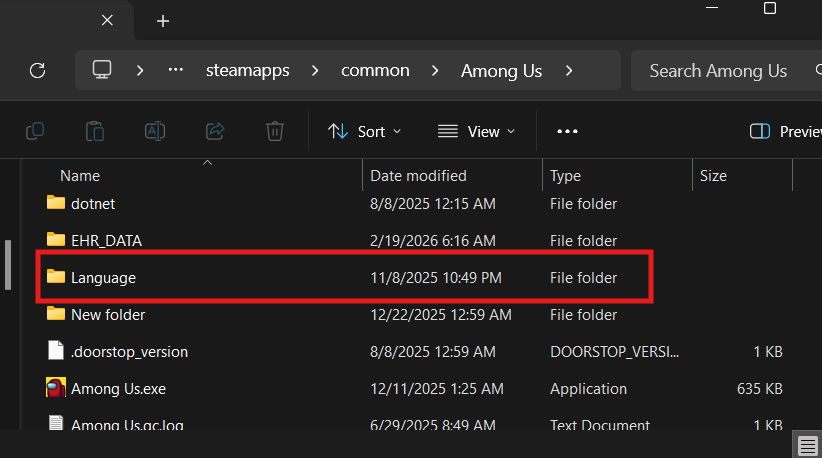
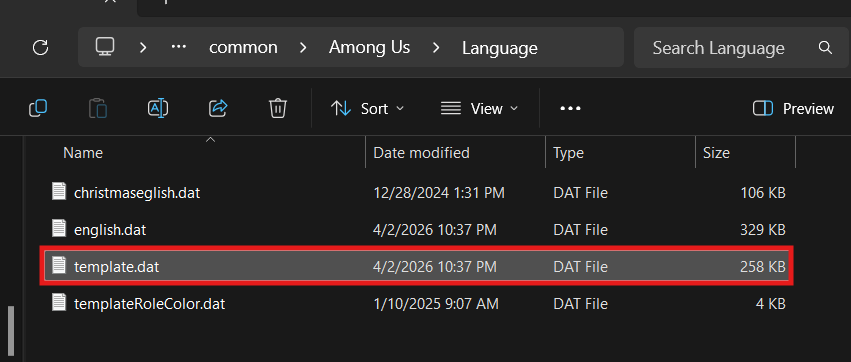
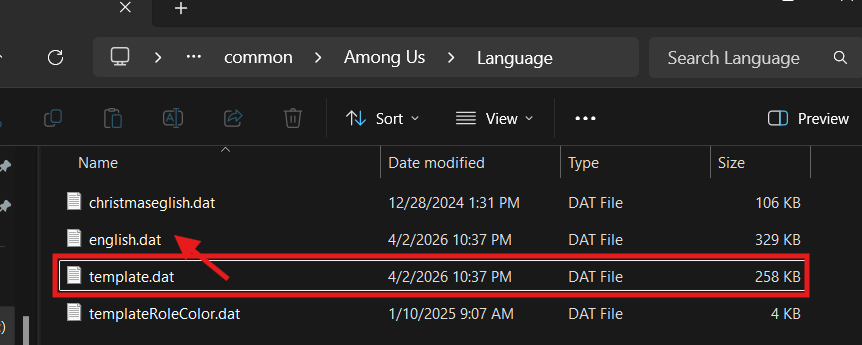
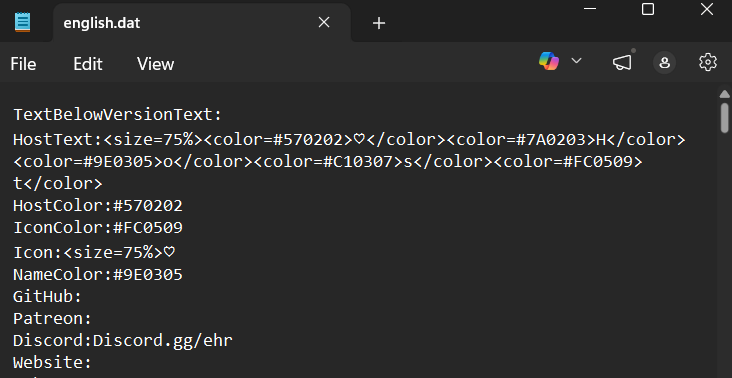
When you first download the mod, you will usually see a template.dat file in your language folder. To use it, rename template.dat to english.dat, then open it and fill in the values you want to customize.
Solid Colors First
If you are new to this, start here. Solid colors are the easiest to test because each line only uses one hex color code. Once this works, you can move on to more advanced styling later.
HostColor: / IconColor: / NameColor:
These use normal hex color codes like
#3A86FF, #8338EC, or #06D6A0.
HostText:
This colors the entire word using one color.
Icon:
Changes the symbol next to the host name. Try symbols like ★ ✿ ◆ ♣
Gradient Wrapping
Gradients work by wrapping each letter in its own
<color=...> tag and slowly changing the hex code from
one letter to the next. That is what gives the text a smooth fade instead
of one flat solid color.
Start with a short word first. Each letter gets its own color tag, and the colors should move in a gentle order instead of jumping around.
Admin and staff tags work the same way: color one character at a time so the tag fades smoothly instead of jumping between shades.
Quick Tips
- Use hex colors like
#3A86FF,#8338EC, or#06D6A0. - Solid colors are easier to create and debug than gradients.
- Wrap each letter in its own
<color=...>tag for more advanced styling. - Keep a backup of both template.dat and english.dat.
- If the game does not update right away, save the file then click F5 + T.
- Copy working examples first, then change colors one step at a time.
- If your game language is another language be sure to set the file to (your language.dat).
- You may need to run a round in order to populate the language file depenidng on the mod.
- You can change roles or taglines, not just color. If you`re familiar with my lobbies Gatitos > VIP Gatos > Mod for example.
EHR Lobby Color Generator
Choose solid colors or gradients for standard labels like Host, VIP, Moderator and Admin. Everyone gets fresh random starting colors; the generated labels use only <color> markup, with no font or size tags. Uncheck anything you want to leave alone.
Download a complete file: This starts with a blank template.dat, not anyone's personal lobby settings. Only supported entries already in the source are changed, using plain text plus color codes—no copied fonts, decorations, or preset color palette. Upload your own .dat to preserve its other settings. Make a backup first.
Choose your label colors
Each label has its own colors.
Loading label controls…
Simple host & icon colors
These settings use a single hex code, not a text gradient. Their starting colors are random too. Uncheck a field to preserve its original value.
Generated language entries
Live output for the selected settings. Copy these lines individually into a language file, or download a complete .dat with the rest of your source preserved.
Only selected keys present in the chosen file are replaced; optional keys missing from the blank template are skipped, not invented. Repeated keys are all updated. Existing wording/formatting in selected fields is replaced by a plain standard label with colors only; other file content stays unchanged. To keep a different language or your other settings, upload its .dat first.